
Just like I did with the Queens, Tango, and Zip minigames, in this notebook I will show you how to model and solve the LinkedIn Mini Sudoku using LO.
What Sudoku is
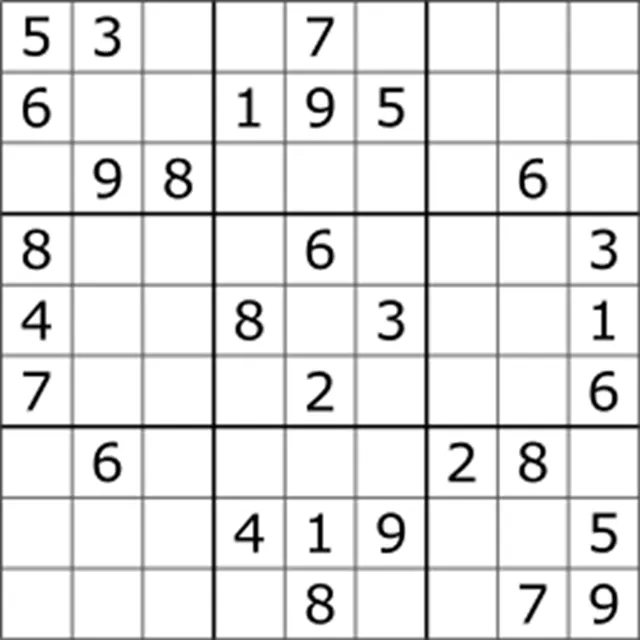
Figure 1:Example of a classic Sudoku puzzle. Source Wikipedia
Mini Sudoku is based on the classic Sudoku game (from the Japanese 数独, meaning unique numbers in a free translation), which originally consists of a 9 9 grid and 9 smaller 3 3 matrices, with some squares already pre-filled with digits from 1 to 9. The meaning of its name is due to its objective of filling all the squares without repeating digits in the rows, columns, and smaller grids.
How to Play Mini Sudoku
In the case of Mini Sudoku, the game consists of a grid with smaller dimensions than the classic, 6 6 grid, composed of six 2 3 submatrices.
- Objective
- Fill all the empty spaces in the game grid with digits from 1 to 6
- Rules
- Each row, column, and mini-grid of the main game matrix must be filled with a digit from 1 to 6, without repetition in each row, column, or smaller grid.
Problem Modeling
As I did in my previous articles, the LO model for the Mini Sudoku game requires the definition of the following components:
Ranges
Sets
Objective function
Decision Variables
Constraints
First, let’s define these components considering the most general scenario for building the Abstract Model for the Sudoku game before defining them for the more specific case of Mini Sudoku.
Ranges
In order to consider the most general cases, five ranges will be considered: and to represent the dimensions of the main grid, and for the dimensions of the smaller grids, and an interval for the range of possible values a square can receive.
- The row range, where is the total number of rows (in this case, )
- The column range, where the total number of columns is equal to the number of rows for dealing with a square matrix
- Range of possible values, where is the total number of possible digits, which is expected to be equal to the dimensions of the grid
- Number of rows in the game’s submatrices, where is the total number of rows in each submatrix
- Number of columns in the game’s submatrices, where is the total number of columns in each submatrix, which is expected to be , that is, the number of squares in each submatrix should be equal to the number of possible digits.
Sets
To facilitate the definition of the constraints, it is important to define at least the set of submatrices and of pre-filled squares. Furthermore, it is necessary to clearly define which squares of the board comprise each of the submatrices . For example, the first submatrix is composed of squares in rows 1 and 2 and columns whose index ranges go from 1 to 3. is also composed of squares in rows 1 and 2, but the column indices range from 4 to 6, which is the second half of the column range; and so on for the remaining .
- Set of submatrices existing in the game
- Set of squares that belong to the submatrix
- Subset of pre-filled squares.
Decision Variables
The decision variables will be binary , representing the decision of whether square is filled with the value . Therefore, as with the models of the other LinkedIn minigames, the Mini Sudoku is a BLOP.
- if square is filled with the digit
- otherwise.
Objective Function
Once again, as in previous articles, the Sudoku optimization problem does not have a function to be optimized, since we only want to find a solution that satisfies all the rules of the game. Therefore, the BLPP is a feasibility problem, whose objective function consists of maximizing (or minimizing) an arbitrary constant.
Constraints
Finally, with all the previously defined components, let’s translate the Sudoku rules into mathematical formulations for the BLOP model.
- Binary Constraints
- First of all, it’s important to clearly state the binary nature of the decision variables in the constraint set.
- Unique-Digits-Per-Row Constraints
- Since there can be no repetition of values for each row, the sum of the for each row must be equal to 1, and there must be a such constraint for column and for each digit , which in the case of Mini Sudoku will result in 36 constraints.
- Unique-Digits-Per-Column Constraints
- The same logic applies to each column of the game, with one constraint for each row and possible digit , resulting in 36 more constraints.
- Unique-Digits-Per-Submatrix Constraints
- With the set of submatrices already well defined, it becomes easier to define the set of constraints that prevent repetition of digits for each submatrix .
- Single-Digit-Per-Square Constraints
- In addition, it is necessary to impose a set of constraints to prevent a square from being filled with more than one digit, which is achieved if the sum of is equal to 1 for each square existing in the game; therefore, 36 more constraints in the case of Mini Sudoku.
- Already-Filled-Squares Constraints
- Finally, for each already filled square, we must remember to impose that if the square is already filled with the digit .
Abstract Model
With all the components set, we now have assembled the abstract model for a Sudoku game. It’s important to remember that this model assumes the game’s submatrices will be rectangular with dimensions , such that .
Concrete Model
The example to be solved in this notebook will be Mini Sudoku No. 60, published on LinkedIn on October 10th, 2025
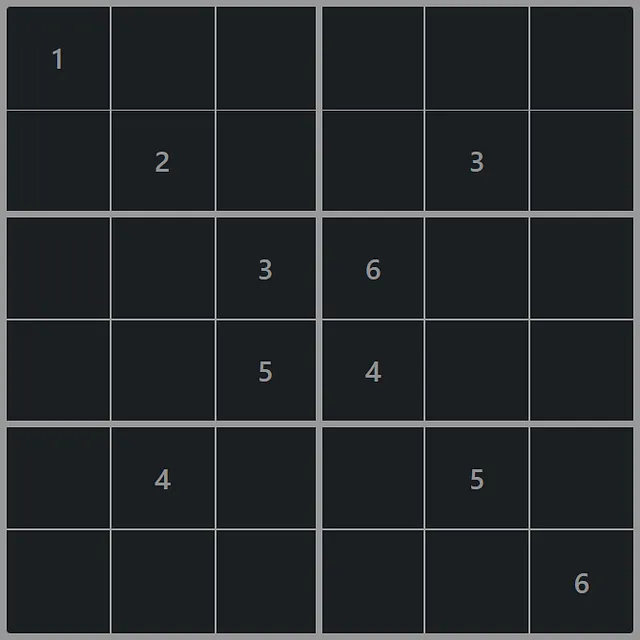
Figure 3:Mini Sudoku No. 60, October 10th, 2025 (Source: LinkedIn)
Based on the abstract model, it is possible to instantiate a concrete model for this game, as shown below.
S.t.:
- Unique-Digits-Per-Row Constraints
- (Digit 1 on Row 1)
- (Digit 1 on Row 2)
- (Digit 1 on Row 3)
- (Digit 1 on Row 4)
- (Digit 1 on Row 5)
- (Digit 1 on Row 6)
- (Digit 2 on Row 1)
- (Digit 2 on Row 2)
- (Digit 2 on Row 3)
- (Digit 2 on Row 4)
- (Digit 2 on Row 5)
- (Digit 2 on Row 6)
- (Digit 3 on Row 1)
- (Digit 3 on Row 2)
- (Digit 3 on Row 3)
- (Digit 3 on Row 4)
- (Digit 3 on Row 5)
- (Digit 3 on Row 6)
- (Digit 4 on Row 1)
- (Digit 4 on Row 2)
- (Digit 4 on Row 3)
- (Digit 4 on Row 4)
- (Digit 4 on Row 5)
- (Digit 4 on Row 6)
- (Digit 5 on Row 1)
- (Digit 5 on Row 2)
- (Digit 5 on Row 3)
- (Digit 5 on Row 4)
- (Digit 5 on Row 5)
- (Digit 5 on Row 6)
- (Digit 6 on Row 1)
- (Digit 6 on Row 2)
- (Digit 6 on Row 3)
- (Digit 6 on Row 4)
- (Digit 6 on Row 5)
- (Digit 6 on Row 6)
- Unique-Digits-Per-Column Constraints
- (Digit 1 on Column 1)
- (Digit 1 on Column 2)
- (Digit 1 on Column 3)
- (Digit 1 on Column 4)
- (Digit 1 on Column 5)
- (Digit 1 on Column 6)
- (Digit 2 on Column 1)
- (Digit 2 on Column 2)
- (Digit 2 on Column 3)
- (Digit 2 on Column 4)
- (Digit 2 on Column 5)
- (Digit 2 on Column 6)
- (Digit 3 on Column 1)
- (Digit 3 on Column 2)
- (Digit 3 on Column 3)
- (Digit 3 on Column 4)
- (Digit 3 on Column 5)
- (Digit 3 on Column 6)
- (Digit 4 on Column 1)
- (Digit 4 on Column 2)
- (Digit 4 on Column 3)
- (Digit 4 on Column 4)
- (Digit 4 on Column 5)
- (Digit 4 on Column 6)
- (Digit 5 on Column 1)
- (Digit 5 on Column 2)
- (Digit 5 on Column 3)
- (Digit 5 on Column 4)
- (Digit 5 on Column 5)
- (Digit 5 on Column 6)
- (Digit 6 on Column 1)
- (Digit 6 on Column 2)
- (Digit 6 on Column 3)
- (Digit 6 on Column 4)
- (Digit 6 on Column 5)
- (Digit 6 on Column 6)
- Unique-Digits-Per-Submatrix Constraints
- (Digit 1 on Submatrix )
- (Digit 2 on Submatrix )
- (Digit 3 on Submatrix )
- (Digit 4 on Submatrix )
- (Digit 5 on Submatrix )
- (Digit 6 on Submatrix )
- (Digit 1 on Submatrix )
- (Digit 2 on Submatrix )
- (Digit 3 on Submatrix )
- (Digit 4 on Submatrix )
- (Digit 5 on Submatrix )
- (Digit 6 on Submatrix )
- (Digit 1 on Submatrix )
- (Digit 2 on Submatrix )
- (Digit 3 on Submatrix )
- (Digit 4 on Submatrix )
- (Digit 5 on Submatrix )
- (Digit 6 on Submatrix )
- (Digit 1 on Submatrix )
- (Digit 2 on Submatrix )
- (Digit 3 on Submatrix )
- (Digit 4 on Submatrix )
- (Digit 5 on Submatrix )
- (Digit 6 on Submatrix )
- (Digit 1 on Submatrix )
- (Digit 2 on Submatrix )
- (Digit 3 on Submatrix )
- (Digit 4 on Submatrix )
- (Digit 5 on Submatrix )
- (Digit 6 on Submatrix )
- (Digit 1 on Submatrix )
- (Digit 2 on Submatrix )
- (Digit 3 on Submatrix )
- (Digit 4 on Submatrix )
- (Digit 5 on Submatrix )
- (Digit 6 on Submatrix )
- Single-Digit-Per-Square Constraints
- (Square (1, 1))
- (Square (1, 2))
- (Square (1, 3))
- (Square (1, 4))
- (Square (1, 5))
- (Square (1, 6))
- (Square (2, 1))
- (Square (2, 2))
- (Square (2, 3))
- (Square (2, 4))
- (Square (2, 5))
- (Square (2, 6))
- (Square (3, 1))
- (Square (3, 2))
- (Square (3, 3))
- (Square (3, 4))
- (Square (3, 5))
- (Square (3, 6))
- (Square (4, 1))
- (Square (4, 2))
- (Square (4, 3))
- (Square (4, 4))
- (Square (4, 5))
- (Square (4, 6))
- (Square (5, 1))
- (Square (5, 2))
- (Square (5, 3))
- (Square (5, 4))
- (Square (5, 5))
- (Square (5, 6))
- (Square (6, 1))
- (Square (6, 2))
- (Square (6, 3))
- (Square (6, 4))
- (Square (6, 5))
- (Square (6, 6))
- Already-Filled-Squares Constraints
- (Square (1, 1) has Digit 1)
- (Square (2, 2) has Digit 2)
- (Square (2, 5) has Digit 3)
- (Square (3, 4) has Digit 6)
- (Square (4, 3) has Digit 5)
- (Square (4, 4) has Digit 4)
- (Square (5, 2) has Digit 4)
- (Square (5, 5) has Digit 5)
- (Square (6, 6) has Digit 6)
- Binary Constraints
Application with Pyomo
Just as I did with the Zip minigame, let’s solve Mini Sudoku using Pyomo. The great advantage of this library is that it allows the creation of the optimization model with few lines of code instead of having to define each of the model’s components “manually”, which would be necessary, for example, if we had to build the model in a spreadsheet before solving it with a solution software like Excel Solver or OpenSolver, which could demand a lot of time and attention depending on the size of the problem.
In the case of the Mini Sudoku, as you may have noticed, the model has a huge number of components. Considering only the constraints, there are 216 binary constraints (one for each ), 36 constraints for each set of constraints of unique digits per row, per column, per submatrix, and to guarantee a single digit per square (resulting in a total of 144 constraints), in addition to the constraints for pre-filled squares. In short, a simple Mini Sudoku game will have no fewer than 360 constraints, which is already a too large model to work with manually in a spreadsheet (it’s more worthwhile to simply solve the game than to go through all the work of creating the model to solve it with Solver!).
Considering that the number of constraints in a Sudoku model is given by , where is the order of the square matrix and is the number of pre-filled squares, a common model of a classic Sudoku game, which has a 9x9 matrix, would have no fewer than 1,053 constraints! With Pyomo, not only is model creation greatly facilitated, but it’s even possible to automate this process, simply by providing the problem data.
Importing Libraries
import matplotlib.pyplot as plt
import networkx as nx
import pyomo.environ as pyo
Solving Mini Sudoku
Before getting down to business, let’s create a NetworkX graph that will represent an instance of the Mini Sudoku game in question. For this purpose, a Sudoku class was created with the necessary methods for creating, solving, and displaying the Sudoku puzzle.
class Sudoku():

    def __init__(self, n, grid:tuple):
        self.__n = n

        p, q = grid

        if p*q == n:
            self.__grid = grid
        else:
            raise ValueError("The dimensions of subgrid must match with the sudoku's length")

        G = nx.grid_2d_graph(n, n)
        nx.set_node_attributes(G, 0, "value")
        self.matrix = G

    def set_value_to_square(self, square:tuple, value:int):
        square = tuple(i-1 for i in square)
        self.matrix.nodes[square]["value"] = value

    def get_value_from_square(self, square:tuple) -> int:
        square = tuple(i-1 for i in square)
        return self.matrix.nodes[square]["value"]

    def solve(self):

        # Setting the main inputs of the model.
        n = self.__n
        p, q = self.__grid
        filled_values = [
            (n[0]+1, n[1]+1, self.matrix.nodes[n]["value"]) \
            for n in self.matrix.nodes() if self.matrix.nodes[n]["value"] != 0
        ]

        # Instantiating the Concrete Model.
        model = pyo.ConcreteModel()

        # Ranges
        I = model.I = pyo.RangeSet(n)
        J = model.J = pyo.RangeSet(n)
        K = model.K = pyo.RangeSet(n)
        U = model.u = pyo.RangeSet(p)
        V = model.v = pyo.RangeSet(q)

        # Sets
        S = model.Submatrices = pyo.Set(
            V, U,
            initialize= lambda model, v, u: \
            [(i, j) for i in range(p*(v-1)+1, p*v+1) for j in range(q*(u-1)+1, q*u+1)]
        )
        F = model.FilledValues = pyo.Set(initialize=filled_values)

        # Decision variables
        x = model.x = pyo.Var(I, J, K, within=pyo.Binary, initialize=0)

        # Objective function
        model.obj = pyo.Objective(expr=0)

        # Constraints
        model.unique_digits_per_row_constraints = pyo.Constraint(
            J, K,
            rule=lambda model, j, k: sum(x[i,j,k] for i in I) == 1
        )

        model.unique_digits_per_column_constraints = pyo.Constraint(
            I, K,
            rule=lambda model, i, k: sum(x[i,j,k] for j in J) == 1
        )

        model.unique_digits_per_submatrix_constraints = pyo.Constraint(
            V, U, K,
            rule=lambda model, v, u, k: sum(x[i,j,k] for (i, j) in S[v,u]) == 1
        )

        model.single_digit_per_square_constraints = pyo.Constraint(
            I, J,
            rule=lambda model, i, j: sum(x[i,j,k] for k in K) == 1
        )

        model.alreadey_filled_squares_constraints = pyo.Constraint(
            F,
            rule=lambda model, i, j, k: x[i,j,k] == 1
        )

        # Solving the model by Gurobi.
        solver = pyo.SolverFactory("gurobi")
        solver.solve(model)

        # Saving the solution in the Sudoku grid.
        solution = [(i, j, k) for i in I for j in J for k in K if model.x[i, j, k].value == 1]
        for i, j, k in solution:
            self.set_value_to_square((i, j), k)


    def show(self):
        plt.figure(figsize=(3, 3))
        nx.draw(
            G= self.matrix,
            pos= {(i, j): (j, -i) for (i, j) in self.matrix.nodes()},
            with_labels= True,
            labels= {n: self.matrix.nodes[n]["value"] for n in self.matrix.nodes() if self.matrix.nodes[n]["value"] != 0},
            font_color="white",
            node_size= 1100,
            node_shape="s",
            node_color= "#1B1F22",
            width= 0,
            edgecolors="#999999",
            linewidths= .5,
        )
        plt.show()
It’s worth noting that the Sudoku class will only be instantiated if the product of the dimensions of the Submatrix_ passed in the grid argument matches the size of the Sudoku puzzle.
This allows you to create and display the puzzle in question.
mini_sudoku = Sudoku(6, (2,3))
mini_sudoku.set_value_to_square((1,1), 1)
mini_sudoku.set_value_to_square((2,2), 2)
mini_sudoku.set_value_to_square((2,5), 3)
mini_sudoku.set_value_to_square((3,3), 3)
mini_sudoku.set_value_to_square((3,4), 6)
mini_sudoku.set_value_to_square((4,3), 5)
mini_sudoku.set_value_to_square((4,4), 4)
mini_sudoku.set_value_to_square((5,2), 4)
mini_sudoku.set_value_to_square((5,5), 5)
mini_sudoku.set_value_to_square((6,6), 6)

mini_sudoku.show()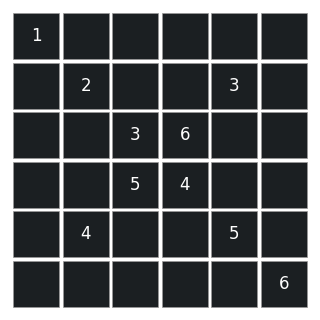
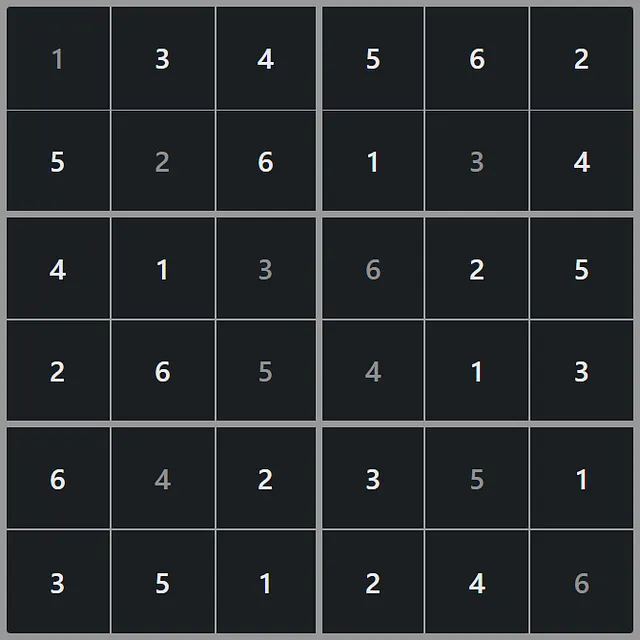
With the game instantiated, simply solve it by calling the solve() method.
mini_sudoku.solve()
mini_sudoku.show()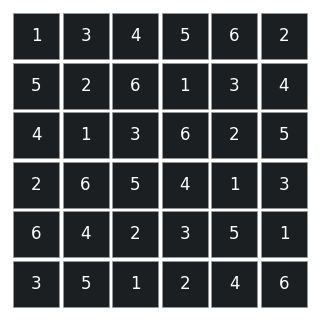
Which corresponds exactly to the solution of the game, as expected.
References
Mini Sudoku. LinkedIn. Available at https://
www .linkedin .com /games /mini -sudoku. Accessed on October 10th, 2025. TAKANO, Kevin; DE FREITAS, Rosiane and DE SÁ, Vinícius Gusmão. O jogo de lógica Sudoku: modelagem teórica, NP-Completude e estratégias algorítmicas exatas e heurísticas. In: CONCURSO DE TRABALHOS DE INICIAÇÃO CIENTÍFICA DA SBC (CTIC-SBC), 34., 2015, Recife. Anais […]. Porto Alegre: Sociedade Brasileira de Computação, 2015. p. 71–80.
Sudoku. Wikipedia. May 7, 2025. Available at Sudoku. Accessed on October 10th, 2025.